 Docs
DocsosCommerce
Integrate Cost+ with your osCommerce 4 store using the official payment module

Integrate Cost+ as a payment method in your osCommerce 4 store. The official NoPayn Payments module uses the Hosted Payment Page flow, so no card data touches your server — fully PCI DSS compliant.
Prerequisites
- Active Cost+ merchant account
- osCommerce 4.x
- PHP 8.1 or later
- cURL extension enabled
- SSL certificate (HTTPS required)
- Admin access to your osCommerce admin panel
Supported Payment Methods
| Checkout Label | NoPayn Identifier |
|---|---|
| Credit / Debit Card | credit-card |
| Apple Pay | apple-pay |
| Google Pay | google-pay |
| Vipps MobilePay | vipps-mobilepay |
Each method can be individually enabled or disabled from the admin panel.
1. Install the Module
Download or clone the module from GitHub.
Copy the lib/ directory into your osCommerce 4 root:
cp -r lib/ /path/to/oscommerce/This places the module files at:
lib/common/modules/orderPayment/nopayn.php
lib/common/modules/orderPayment/nopayn/NoPaynApiClient.php
lib/common/modules/orderPayment/nopayn/NoPaynLogger.php
lib/common/modules/orderPayment/nopayn/NoPaynWebhookHandler.php
In your osCommerce admin panel:
- Navigate to Modules → Payment → Online
- Enable "Show inactive" and "Show not installed" filters if needed
- Find NoPayn Payments and click Install
2. Configure the Module
Log into the Merchant Portal and navigate to Websites, then click on the website you want to connect. Click on Integration where you will find your API key.
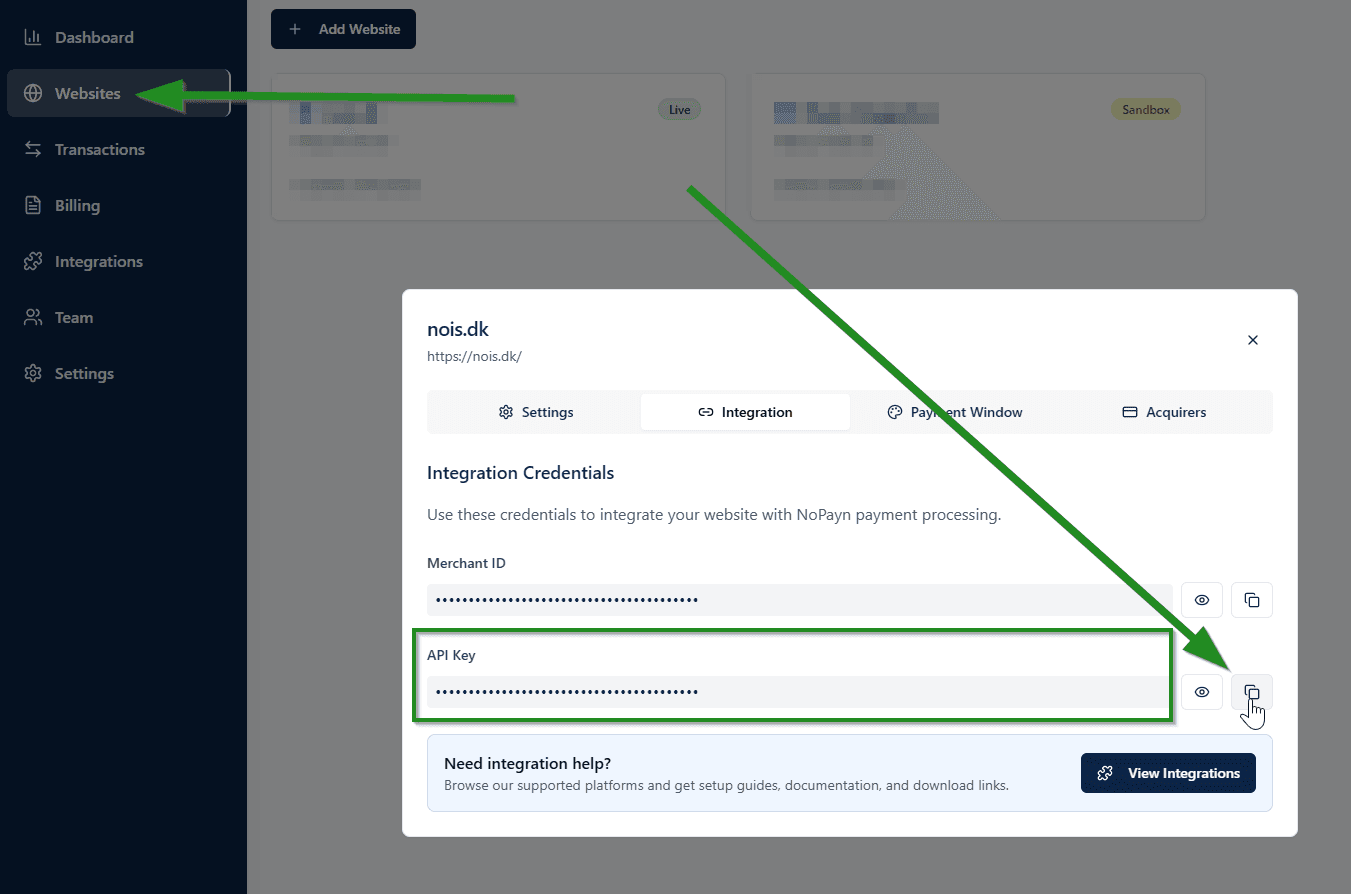
Enter your API Key and configure the following settings:
| Setting | Description | Default |
|---|---|---|
| Enable NoPayn Payments | Master enable/disable switch | True |
| API Key | Your NoPayn API key | — |
| Enable Credit / Debit Card | Show credit/debit card at checkout | True |
| Enable Apple Pay | Show Apple Pay at checkout | True |
| Enable Google Pay | Show Google Pay at checkout | True |
| Enable Vipps MobilePay | Show Vipps MobilePay at checkout | True |
| Manual Capture (Credit Card) | Authorize only — capture when order is completed | False |
| Debug Logging | Write API requests/responses to log | False |
| Completed Order Status | Status set when payment succeeds | Processing |
| Pending Order Status | Status set while awaiting payment | Pending |
| Cancelled Order Status | Status set on cancellation/failure/expiry | Cancelled |
| Payment Zone | Restrict to a geographic zone (optional) | All zones |
| Sort Order | Display order on the checkout page | 0 |
Only activate the payment methods you have been approved for and received confirmation for.
3. Update Checkout Labels (Recommended)
The default osCommerce checkout button labels assume a single-step flow. For a better experience with the offsite payment redirect, update these translations in Admin → Localisation → Languages → English → Define:
| Key | Default | Recommended |
|---|---|---|
TEXT_PAY_WITH_CARD | Pay with card | Go to payment |
TEXT_CONFIRM_AND_PAY | Confirm and pay | Review order |
CONFIRM_ORDER | Confirm order | Confirm and pay |
This improves the customer experience by making the checkout flow clearer — customers understand they'll be redirected to complete payment on a secure page.
4. Payment Flow
Once configured, the payment flow works as follows:
- Customer selects a Cost+ payment method at checkout
- Customer confirms the order
- Module creates a pending order and calls the Cost+ API
- Customer is redirected to the Cost+ Hosted Payment Page (HPP)
- Customer completes payment on the secure HPP
- Customer is redirected back to the store
- Module verifies payment status via the Cost+ API
- Order status is updated accordingly
Payment links expire after 5 minutes. If the customer does not complete payment within this window, the order is automatically marked as cancelled.
5. Webhooks
The module registers a webhook URL with Cost+ for server-to-server status updates. When a payment status changes, Cost+ sends a notification and the module:
- Receives the webhook POST
- Verifies the payment status via API (never trusts the webhook payload)
- Updates the order status in osCommerce
No manual webhook configuration is required — the module handles registration automatically.
Manual Capture
When enabled for credit card payments:
- Payment is authorized but not captured at checkout
- Funds are captured when the order transitions to completed status
- If the order is cancelled, the authorization is automatically voided
Use manual capture if you want to only charge customers when their order ships. This is useful for merchants with longer fulfillment times.
Debug Logging
When Debug Logging is enabled, the module writes to nopayn_debug.log in the osCommerce logs directory. Log entries include:
- All API requests and responses
- Webhook events and processing results
- Capture and void operations
- Errors (always logged, regardless of debug toggle)
All entries are prefixed with NoPayn_ for easy filtering.
Uninstallation
- Go to Modules → Payment → Online in the admin panel
- Select NoPayn Payments
- Click Remove
Uninstalling the module removes the configuration and drops the nopayn_transactions and nopayn_refunds database tables. Make sure to export any data you need before uninstalling.
Test and Launch
Place a few test transactions to ensure everything works smoothly. We recommend testing both successful and failed payments to confirm all scenarios are handled correctly.
Support
Need help? Reach out to our support team at support@costplus.io.